 Inverters & Batteries ship FREE
 Ask about rewards for referring friends and family
 U.S. Based Support
 Want to Add a battery?
solar inverters
Best FranklinWH Battery for Whole-Home Backup (2026)
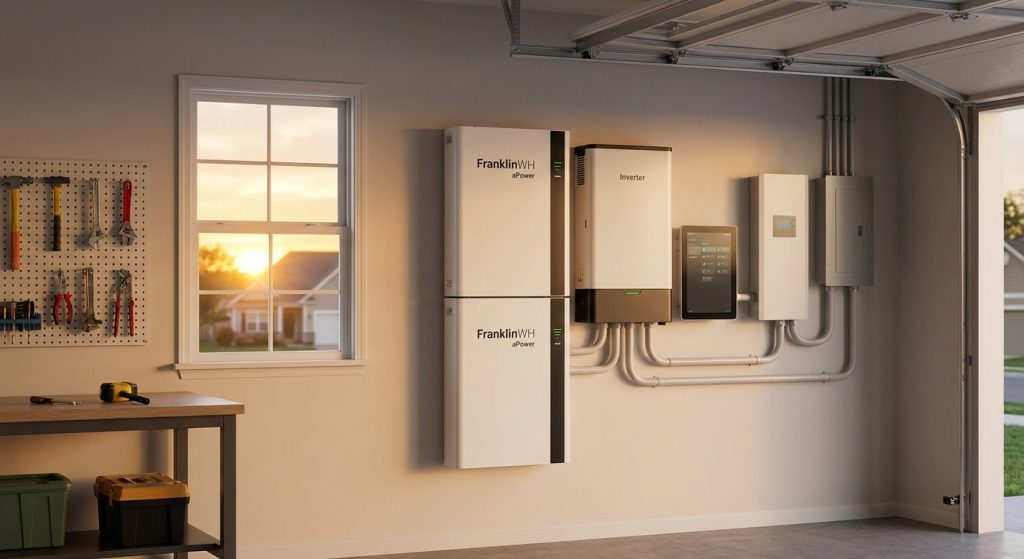
FranklinWH batteries pair a stackable aPower unit with the aGate smart panel to run an entire house through an outage, not just a few circuits. This guide ranks six FranklinWH configurations for whole-home backup and tells you which one fits your load, panel setup, and budget in 2026.
Bottom Line
For most homes running central AC, well pumps, and standard appliances, a two-unit FranklinWH aPower stack (27.2 kWh usable) paired with the aGate smart panel is the Buy for true whole-home backup in 2026. Single-unit setups (13.6 kWh) work for smaller homes running essential circuits only, and three-unit stacks (40.8 kWh) make sense for larger homes or homes adding EV charging. FranklinWH battery systems and inverters ship free through Sun Supply PV, and lead times vary by configuration — confirm current availability before you commit to an install date.
Why this matters
Most battery buyers size for "backup" without checking whether that means five circuits or the whole panel. FranklinWH's aPower plus aGate combination is built specifically to close that gap — the aGate reads your panel's actual loads and manages which circuits draw from battery versus grid, which matters more than raw kWh capacity if you want the furnace, well pump, and kitchen circuits all live during an outage.
The difference between a single aPower unit and a stacked configuration isn't just runtime — it's whether your AC compressor can start without tripping the system. Undersizing is the single most common mistake in whole-home backup planning, and it's an expensive one to fix after installation.
How we ranked these setups
Each configuration below is scored against three factors that matter for whole-home backup specifically: usable capacity against typical whole-home draw, panel integration (does it manage the whole panel or a subpanel), and expansion headroom for adding solar or EV charging later. Rankings reflect published FranklinWH specifications as of 2026 and typical residential load profiles, not lab-tested output from a single home. Verdicts assume grid-tied installation by a licensed installer, since FranklinWH systems are sold through that channel alongside residential DIY buyers who still need licensed electrical work for panel integration.
The ranked list
1. Single aPower unit (13.6 kWh) — the entry point
One aPower unit stores 13.6 kWh usable and covers refrigeration, lighting, internet, and a well pump through a multi-hour outage. It won't reliably carry a central AC compressor start alongside other loads, so "whole-home" here really means "essential-home." This is the right call for smaller homes (under 1,800 sq ft) or households in mild climates without heavy HVAC draw. Consider it for smaller footprints — Skip it if central air is non-negotiable during summer outages.
2. Dual aPower stack + aGate (27.2 kWh) — the standard whole-home pick
Stacking two aPower units gets you to 27.2 kWh usable capacity, and pairing them with the aGate smart panel is what actually delivers whole-home coverage instead of a curated circuit list. The aGate reads real-time load data and sequences startup so AC compressors and well pumps don't overload the inverter output. For a typical 2,000-2,500 sq ft home with central air, this is the configuration that gets you through an 8-12 hour outage without load-shedding individual rooms. Buy — this is the setup most installers spec when a homeowner says "whole house" and means it. Sun Supply PV lists FranklinWH inventory and current lead times on the Sun Supply PV site.
3. Triple aPower stack (40.8 kWh) — the no-compromise pick
Three units in a stack push usable capacity to 40.8 kWh, built for larger homes (3,000+ sq ft), homes with dual-zone HVAC, or households that want multi-day runtime rather than single-outage coverage. It's overbuilt for a modest ranch house, but for a large home with heavy simultaneous loads, it removes the guesswork around whether the system can carry everything at once. Buy for larger square footage or heavy HVAC load — Skip if your home's average draw doesn't come close to justifying the extra unit cost.
4. aPower + aGate + Smart Circuit expansion — the granular-control setup
This configuration adds FranklinWH's smart circuit modules on top of the aGate, giving you circuit-by-circuit visibility and control rather than whole-panel automation alone. It's the pick for homeowners who want to manually prioritize specific circuits (a home office, a sump pump, a medical device) over others during extended outages. The added visibility is a real feature, not a gimmick, but it adds setup complexity that a straightforward whole-home stack doesn't need. Consider it if circuit-level prioritization actually matters to your household — Hold if the standard aGate integration already covers your needs.
5. aPower stack + solar pairing — the self-sufficient setup
Pairing a dual or triple aPower stack with a solar array changes the backup math entirely: instead of draining a fixed battery bank until it's empty, the system recharges during daylight and can carry an outage indefinitely under normal sun conditions. This is the right move for anyone already budgeting for a solar install alongside battery backup, since the incremental cost of adding storage to an existing solar order is lower than retrofitting later. Buy for anyone planning solar in the same project — Wait if solar isn't in this year's budget, since the battery stack still works fine without it.
6. aPower stack with EV charging integration — the future-proof pick
FranklinWH's ecosystem supports EV charging management alongside whole-home backup, letting the system balance battery reserve against EV charging load so you're not draining backup capacity to top off a car during an outage. This matters increasingly in 2026 as EV ownership climbs and homeowners start asking whether their battery system can serve double duty. Consider it if an EV purchase is on the near-term horizon — Skip the EV-specific configuration if you don't own or plan to own an EV in the next year or two, since you'd be paying for integration you won't use.
Comparison table
| Setup | Usable Capacity | Panel Integration | Best For | Verdict |
|---|---|---|---|---|
| Single aPower | 13.6 kWh | Subpanel/essential circuits | Smaller homes, mild climates | Consider |
| Dual aPower + aGate | 27.2 kWh | Full panel | Standard 2,000-2,500 sq ft homes | Buy |
| Triple aPower stack | 40.8 kWh | Full panel | Large homes, heavy HVAC | Buy |
| aPower + Smart Circuits | 27.2-40.8 kWh | Circuit-level | Households needing manual prioritization | Consider |
| aPower + solar pairing | 27.2-40.8 kWh | Full panel | Homes adding solar this cycle | Buy |
| aPower + EV integration | 27.2-40.8 kWh | Full panel + EV load balancing | Current or near-term EV owners | Consider |
Where to buy
Buy FranklinWH batteries and the aGate smart panel from an authorized distributor so you're not gambling on gray-market units without manufacturer support behind them. Confirm your installer is licensed for the panel integration work before ordering — the aGate's whole-panel management is where most of the value lives, and it requires proper electrical work to configure correctly. Batteries and inverters ship free, but availability on specific configurations varies, so contact a distributor directly for current lead times rather than assuming stock on hand.
FAQ
What's the best FranklinWH battery setup for whole-home backup? A dual aPower stack (27.2 kWh usable) paired with the aGate smart panel covers most standard homes with central AC through an extended outage. Larger homes or those with heavy HVAC load should size up to a triple stack at 40.8 kWh.
Is one aPower unit enough for whole-home backup? A single 13.6 kWh aPower unit typically covers essential circuits — refrigeration, lighting, a well pump — but struggles with central AC compressor starts alongside other loads. Treat single-unit setups as essential-circuit backup, not full whole-home coverage.
Do I need the aGate to get whole-home backup from FranklinWH? Yes — the aGate smart panel is what manages load sequencing across your entire panel rather than a curated subset of circuits. Without it, you're generally limited to backing up specific circuits rather than the whole home.
How much does a FranklinWH whole-home battery setup cost? Pricing varies by configuration, unit count, and installation scope, so check current pricing directly with a distributor rather than relying on a fixed number. Cost scales with the number of aPower units stacked and whether smart circuit modules or EV integration are added.
Can FranklinWH batteries work without solar panels? Yes — an aPower stack backs up your home from stored charge alone and recharges from the grid when utility power is available. Pairing with solar extends runtime during an outage but isn't required for the system to function.
How long does a FranklinWH battery last during an outage? Runtime depends on your home's load and the number of aPower units stacked, with a dual-unit setup (27.2 kWh) typically covering 8-12 hours of moderate whole-home use. Adding units or pairing with solar extends that window significantly.
Is FranklinWH better than a single large battery unit for whole-home backup? FranklinWH's stackable design lets you size capacity to your actual home rather than over- or under-buying on a fixed unit, which is the main advantage over non-stackable systems. The aGate's panel-wide load management is the other differentiator that matters for whole-home coverage specifically.
Do batteries and inverters ship free from Sun Supply PV? Yes — batteries and inverters ship free, though lead times on specific FranklinWH configurations vary and should be confirmed directly before ordering.
One last thing
The aGate isn't optional hardware bolted onto a battery — it's the component that actually decides whether your setup delivers on "whole-home" or just backs up a handful of circuits you picked in advance. Homeowners who skip it to save on the initial order are usually the ones calling back in 2026 asking why their AC won't run during an outage. Size the panel integration first, then size the battery stack to match — not the other way around.
