 Inverters & Batteries ship FREE
 Ask about rewards for referring friends and family
 U.S. Based Support
 Want to Add a battery?
solar inverters
SPAN Smart Panel for Whole-Home Circuit-Level Monitoring
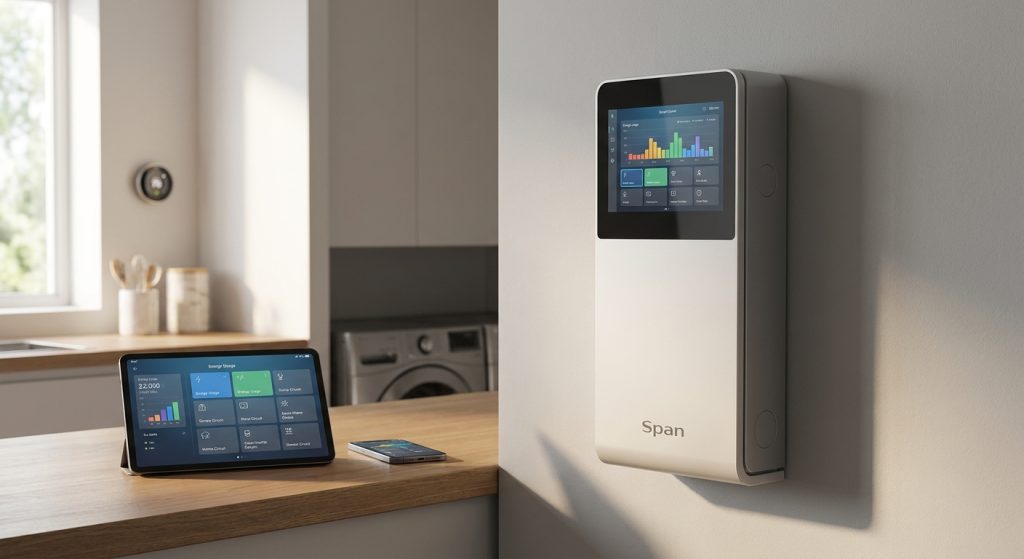
SPAN Smart Panel turns a standard electrical panel into a circuit-level monitoring system, showing real-time usage on every breaker instead of one lump number for the whole house. This guide breaks down who actually needs that level of detail and which battery pairings make the most sense in 2026. It's built for homeowners who want circuit-by-circuit visibility and remote load control, not just a solar production app — particularly homes pairing it with a battery system like Tesla Powerwall or FranklinWH that want to control which circuits stay live during an outage. If you just want basic solar production data, a standard inverter app covers that without the panel-level rewire. Licensed installers and residential buyers both land on SPAN for the same reason: whole-home circuit-level monitoring solves the load-visibility question that solar-only monitoring never answers.
Why this matters
Most solar monitoring apps show you production and maybe whole-house consumption as one number. That's fine until you're trying to size a battery for backup, troubleshoot a circuit that's tripping, or figure out why your bill didn't drop the way the proposal promised. Circuit-level data answers those questions directly instead of making you guess. In 2026, with EV chargers, heat pumps, and battery backup stacking onto more residential panels, that granularity stopped being a nice-to-have for a lot of buyers.
Who this is for
SPAN Smart Panel monitoring fits two buyer types cleanly: homeowners running a battery backup system who want to decide exactly which circuits stay powered during a grid outage, and licensed installers who need panel-level data to diagnose load issues or right-size a system before it's sold. It's overkill for someone who just wants a solar production number on their phone, since that job is handled by the inverter's own app with no panel replacement required.
What to look for in circuit-level monitoring for homeowners and installers
Actual circuit-level resolution, not aggregated zones
Some monitoring setups group circuits into zones and call it circuit-level. Real circuit-level data means every individual breaker position reports its own load independently, which is what lets you isolate a single problem circuit instead of guessing across a zone of six.
Backup prioritization and load shedding logic
During an outage, not every circuit needs power at once. A panel that lets you rank circuits and automatically shed lower-priority loads when battery capacity gets tight stretches your backup runtime further than a system that just powers everything until the battery is empty.
Battery brand compatibility
The panel is only as useful as the battery it's paired with. Confirm compatibility before buying, since pairing decisions differ across Tesla Powerwall, FranklinWH, and Enphase battery setups, and the integration depth varies by brand and firmware version.
EV charger circuit control
Homes with a Level 2 EV charger benefit the most from circuit-level control, since the charger is usually the single largest load on the panel. Being able to throttle or shed that circuit specifically during an outage, instead of losing power to the whole garage subpanel, is the difference between a charged car and a dead one.
App data depth and historical logging
Real-time is good, historical is better. Look for a system that logs circuit-level usage over weeks or months, not just a live snapshot, so you can spot a slow leak like a failing water heater element before it shows up as a full replacement.
Panel replacement vs. sub-panel install
SPAN Smart Panel is typically installed as a full main panel replacement, rated for 200A service in most residential configurations. That is a bigger job than a monitoring add-on clipped to your existing panel, so factor install scope and downtime into the decision, not just the monitoring feature list.
Top pairings for whole-home circuit-level monitoring
The EV household pairing. Homes running a Level 2 charger alongside solar and battery storage get the most out of circuit-level data, since the charger circuit is usually the biggest single load in the house. Pairing with Tesla Powerwall for homes with EV chargers lets you monitor and prioritize that circuit specifically during an outage instead of losing charging capacity along with everything else on the subpanel. Powerwall and inverter units ship free through Sun Supply PV, subject to availability. A strong fit for EV-equipped homes running backup.
The whole-home backup pairing. If the goal is keeping the entire house running through an extended outage rather than just critical loads, a FranklinWH setup paired with circuit-level monitoring gives you the load-shedding logic to stretch capacity across more circuits at once. Check the best FranklinWH battery setup for whole-home backup for configuration options. FranklinWH batteries ship free. A strong fit for buyers prioritizing full-house coverage over selective circuits.
The microinverter-system pairing. Homes already running Enphase microinverters benefit from pairing circuit-level panel monitoring with an Enphase battery, since the production data and the consumption data live closer together in the same ecosystem. See the best Enphase battery model for your home backup needs to match capacity to your panel's circuit count. Worth considering if you're already on Enphase hardware, since the integration is tighter but you should confirm firmware compatibility before ordering.
The monitoring-only setup. Some buyers want the circuit-level data without a battery attached at all, just to track usage and catch problem circuits early. That is a legitimate use case, but it means paying for a full panel replacement for data alone, with no backup benefit attached. Worth considering only if circuit-level diagnostics are the actual goal, since otherwise the backup pairings above deliver more value per dollar spent on the same panel.
What to avoid
- Assuming any smart panel gives circuit-level data. Some products marketed as smart panels only monitor at the main breaker or in aggregated zones. Confirm true per-circuit resolution before buying, not after install.
- Skipping the battery compatibility check. Not every battery brand integrates with every monitoring panel at the same depth. Confirm the pairing works the way you expect before the panel goes in the wall.
- Treating panel replacement as a quick add-on. This is a main panel swap in most cases, not a clip-on sensor. Budget for the install scope, not just the hardware line item.
Pairing comparison
| Pairing | Circuit-level data | Load shedding | Best for |
|---|---|---|---|
| SPAN + Tesla Powerwall | Yes | Yes | EV-charging households |
| SPAN + FranklinWH | Yes | Yes | Full-house backup priority |
| SPAN + Enphase battery | Yes | Yes | Existing Enphase systems |
| SPAN monitoring only | Yes | Limited | Diagnostics without backup |
FAQ
What does SPAN Smart Panel monitoring actually show you?
It shows real-time and historical usage on every individual circuit in your panel, not just a whole-house total. That is the core difference from a standard inverter or solar production app.
Is SPAN Smart Panel monitoring worth it without a battery?
It can be, if diagnostics and usage tracking are the goal, but most of the value shows up when it is paired with a battery for backup load prioritization. Without a battery, you are paying for panel-level data with no outage-management benefit attached.
Does SPAN work with Tesla Powerwall?
Yes, circuit-level monitoring pairs with Tesla Powerwall setups, particularly in homes with EV chargers where prioritizing that circuit during an outage matters most. Confirm current firmware compatibility before ordering either component.
How much does a SPAN Smart Panel install cost?
Costs vary by panel size, service rating, and labor in your market, so contact a licensed installer for a project-specific quote rather than relying on a national average. Installation is typically a full main panel replacement, not a plug-in add-on.
Can SPAN Smart Panel replace my existing 200A panel?
In most residential setups, yes, since SPAN Smart Panel is designed as a main panel replacement rated for 200A service. Confirm your home's existing service size and breaker count with an installer before assuming a direct swap.
Does circuit-level monitoring work with FranklinWH batteries?
Yes, FranklinWH pairs with circuit-level monitoring for whole-home backup configurations where load shedding across many circuits matters more than isolating one or two.
Is circuit-level monitoring only for installers, or can homeowners use it directly?
Both. Installers use it to diagnose load issues and size systems accurately; homeowners use the same data to track usage, prioritize backup circuits, and catch problem appliances early.
What's the difference between SPAN and a standard solar monitoring app?
A standard app usually shows production and one aggregate consumption number. SPAN shows consumption broken out by individual circuit, which is a different level of detail entirely.
One last thing
The biggest mistake buyers make with circuit-level monitoring is not the panel choice, it is skipping the load-shedding configuration step after install. A panel that can prioritize circuits does nothing for you if every circuit is left set to the same priority level. That is a five-minute app setting that determines whether your fridge or your garage lights stay on when the battery is running low in 2026.
Related guides
